Press ESC to close · Ctrl+K to open

Minesweeper Programmed with Artificial Intelligence

🚀 New version February 2026! We have generated a new version of Minesweeper using Claude Opus 4.6. The quality leap compared to previous versions is impressive.
👉 See Minesweeper III: A Quality Leap

Minesweeper Programmed with Artificial Intelligence

We continue to explore applications for new artificial intelligence engines. Today, it’s the turn of one of the classics, Minesweeper. Through AI, we will generate Minesweeper, programmed with Artificial Intelligence, and we will do it in HTML so it can be executed in any browser.

Before we get started, a bit of information about the classic game.

Minesweeper generated by Artificial Intelligence


The game of Minesweeper is a logic and strategy game in which the player must find and mark all the hidden mines on a game board. The objective is to locate all the mines without detonating any of them, for which the player must have good deduction skills to determine where the mines are. The game board consists of cells, which can be empty, contain a mine, or contain numbers indicating the number of mines adjacent to the respective cell. The player can mark suspicious cells to indicate that they believe there is a mine, which helps them remember which area they need to pay attention to. - By AI


Once we are in context, let’s get to it.

Important note: As we know, AIs do not always generate the same outputs for the same inputs; therefore, the development carried out here is very likely not to be replicated 100%. However, since it is a simple game, it is very possible that we will achieve good results with different codes.

Tools to use:

  • Notepad++: to paste our code and save the file.

Steps to follow

Step 1: We request the AI from Open AI for the code through the Playground. There are many ways to ask for it, and the more details we give, the richer the response will be. In my case, I specified a specific 3*3 board.

Instruction in Playground to generate 3*3 Minesweeper

Depending on the quality of our "prompt," we will have better or worse responses and will have to tweak it more or less. In my case, I had to do several tests to achieve the first base.


Step 2: Analyze the output code. It is very likely that you will have to repeat the first two steps if the quality of the code generated does not meet your expectations,

Tip: Keep insisting while trying to be detailed with the instructions, so that in one of the iterations you can achieve a good base to work on.

Code
<html>
<head>
<title>Minesweeper</title>
<style type="text/css">
.casilla {
    width: 30px;
    height: 30px;
    text-align: center;
    border: 1px solid #999;
    font-size: 18px;
    float: left;
    background-color: #eee;
}
.casilla.vacia {
    background-color: #fff;
}
.casilla.mina {
    background-color: #f00;
    color: #fff;
    font-weight: bold;
}
</style>
</head>
<body>
<div>
    <h1>Minesweeper</h1>
    <div>
        <button onclick="generarTablero()">Restart</button>
    </div>
    <div id="tablero">
        
    </div>
</div>
<script>
    var tablero = [];
    var ancho = 3;
    var alto = 3;
    var minas = 1;
    
    function generarTablero(){
        tablero = [];
        let tableroHTML = '';
        for(let y = 0; y < alto; y++){
            let fila = [];
            for(let x = 0; x < ancho; x++){
                let casilla = {
                    mina: false,
                    marcada: false,
                    descubierta: false
                };
                
                fila.push(casilla);
                
                tableroHTML += `<div class="casilla" data-x="${x}" data-y="${y}" onclick="descubrirCasilla(${x},${y})" oncontextmenu="marcarCasilla(${x},${y})"></div>`
            }
            tablero.push(fila);
        }
        document.getElementById('tablero').innerHTML = tableroHTML;
        generarMinas(minas);
    }
    
    function generarMinas(cantidadMinas){
        for(let i = 0; i < cantidadMinas; i++){
            let x = Math.floor(Math.random() * ancho);
            let y = Math.floor(Math.random() * alto);
            tablero[y][x].mina = true;
        }
    }
    
    function descubrirCasilla(x, y){
        if(tablero[y][x].marcada || tablero[y][x].descubierta) return;
        if(tablero[y][x].mina){
            descubrirTodasLasMinas();
            alert('Game Over');
        } else {
            tablero[y][x].descubierta = true;
            renderizarTablero();
            if(comprobarVictoria()){
                alert('You won');
            }
        }
    }
    
    function marcarCasilla(x, y){
        tablero[y][x].marcada = !tablero[y][x].marcada;
        renderizarTablero();
    }
    
    function descubrirTodasLasMinas(){
        tablero.forEach(function(fila, y){
            fila.forEach(function(casilla, x){
                if(casilla.mina){
                    tablero[y][x].descubierta = true;
                }
            });
        });
        renderizarTablero();
    }
    
    function comprobarVictoria(){
        let sinDescubrir = tablero.every(function(fila){
            return fila.every(function(casilla){
                return casilla.mina || casilla.descubierta;
            });
        });
        return sinDescubrir;
    }
    
    function renderizarTablero(){
        tablero.forEach(function(fila, y){
            fila.forEach(function(casilla, x){
                let celda = document.querySelector(`div[data-x="${x}"][data-y="${y}"]`);
                if(casilla.descubierta){
                    celda.classList.add('vacia');
                    if(casilla.mina){
                        celda.innerText = 'X';
                    } else {
                        let cantidadMinasAlrededor = contarMinasAlrededor(x, y);
                        celda.innerText = cantidadMinasAlrededor > 0 ? cantidadMinasAlrededor : '';
                    }
                } else if(casilla.marcada){
                    celda.innerText = 'M';
                } else {
                    celda.innerText = '';
                }
            });
        });
    }
    
    function contarMinasAlrededor(x, y){
        let minasAlrededor = 0;
        for(let dy = -1; dy <= 1; dy++){
            for(let dx = -1; dx <= 1; dx++){
                if(dx == 0 && dy == 0) continue;
                let xAlrededor = x + dx;
                let yAlrededor = y + dy;
                if(xAlrededor >= 0 && xAlrededor < ancho && yAlrededor >= 0 && yAlrededor < alto){
                    if(tablero[yAlrededor][xAlrededor].mina){
                        minasAlrededor++;
                    }
                }
            }
        }
        return minasAlrededor;
    }
    
    generarTablero();
	window.onload = generarTablero;
</script>
</body>
</html>

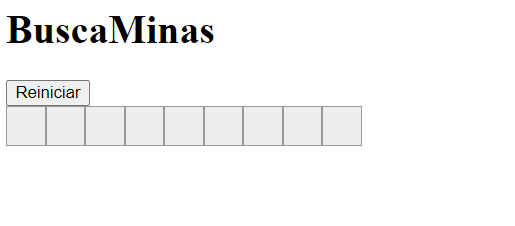
If you save this code as a ".html" file, you will notice a small error.

Application executed in Chrome.

Exactly!! It has generated the grid, but it is representing it in a row shape. We can verify this with the Inspect option in Chrome and see the elements that form the object.


Step 3: Error correction.

In this step, we correct the error of showing only one row, and we did it by asking the AI to fix it on its own. So after insisting 3 times looking for different "prompts," it returned what we were looking for.

Code
document.getElementById('tablero').style.display = 'grid';
document.getElementById('tablero').style.gridTemplateColumns = 'repeat(25, 30px)';

With these two instructions, we now correctly place the game field:

Minesweeper with a 3*3 board

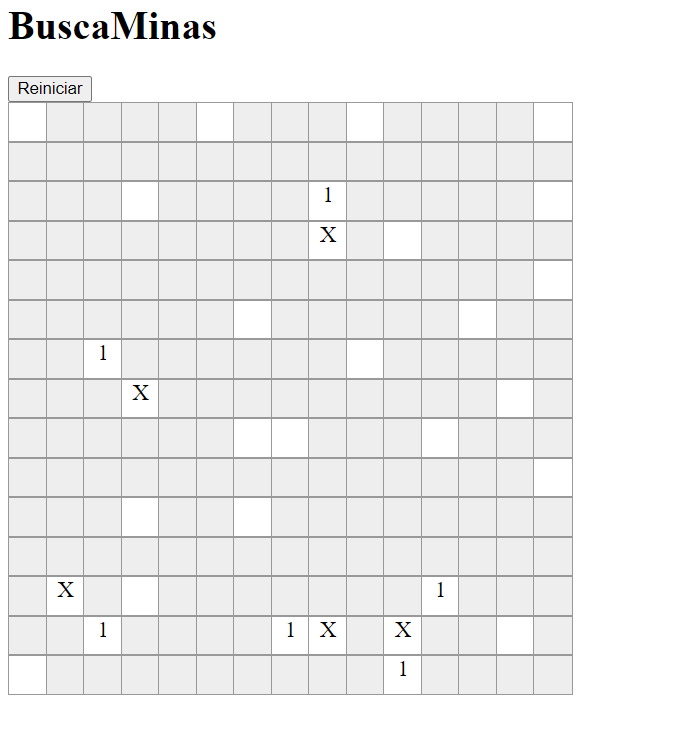
Now it’s time to play and see if it meets our expectations. And of course, try to win a game.

Game won

Step 4: Modify to your liking. Once we have this base generated at an impressive speed through AI, it is a good time to change the game characteristics. I have several ideas to implement with the code.

I leave you these ideas to practice and the code of the latest version.

I hope you enjoyed this Minesweeper programmed with Artificial Intelligence. We will continue to experiment.


FINAL CODE

Code
<html>
<head>
<title>Minesweeper</title>
<style type="text/css">
.casilla {
    width: 30px;
    height: 30px;
    text-align: center;
    border: 1px solid #999;
    font-size: 18px;
    float: left;
    background-color: #eee;
}
.casilla.vacia {
    background-color: #fff;
}
.casilla.mina {
    background-color: #f00;
    color: #fff;
    font-weight: bold;
}
</style>
</head>
<body>
<div>
    <h1>Minesweeper</h1>
    <div>
        <button onclick="generarTablero()">Restart</button>
    </div>
    <div id="tablero">
        
    </div>
</div>
<script>
    var tablero = [];
    var ancho = 15;
    var alto = 15;
    var minas = 5;
    
    function generarTablero(){
        tablero = [];
        let tableroHTML = '';
        for(let y = 0; y < alto; y++){
            let fila = [];
            for(let x = 0; x < ancho; x++){
                let casilla = {
                    mina: false,
                    marcada: false,
                    descubierta: false
                };
                
                fila.push(casilla);
                
                tableroHTML += `<div class="casilla" data-x="${x}" data-y="${y}" onclick="descubrirCasilla(${x},${y})" oncontextmenu="marcarCasilla(${x},${y})"></div>`
				
            }
            tablero.push(fila);
			
        }
        document.getElementById('tablero').innerHTML = tableroHTML;
		document.getElementById('tablero').style.display = 'grid';
		document.getElementById('tablero').style.gridTemplateColumns = 'repeat(15, 30px)';
		
        generarMinas(minas);
    }

function generarMinas(cantidadMinas){
        for(let i = 0; i < cantidadMinas; i++){
            let x = Math.floor(Math.random() * ancho);
            let y = Math.floor(Math.random() * alto);
            tablero[y][x].mina = true;
        }
    }
    
    function descubrirCasilla(x, y){
        if(tablero[y][x].marcada || tablero[y][x].descubierta) return;
        if(tablero[y][x].mina){
            descubrirTodasLasMinas();
            alert('Game Over');
        } else {
            tablero[y][x].descubierta = true;
            renderizarTablero();
            if(comprobarVictoria()){
                alert('You won');
            }
        }
    }
    
    function marcarCasilla(x, y){
        tablero[y][x].marcada = !tablero[y][x].marcada;
        renderizarTablero();
    }
    
    function descubrirTodasLasMinas(){
        tablero.forEach(function(fila, y){
            fila.forEach(function(casilla, x){
                if(casilla.mina){
                    tablero[y][x].descubierta = true;
                }
            });
        });
        renderizarTablero();
    }
    
    function comprobarVictoria(){
        let sinDescubrir = tablero.every(function(fila){
            return fila.every(function(casilla){
                return casilla.mina || casilla.descubierta;
            });
        });
        return sinDescubrir;
    }
    
    function renderizarTablero(){
        tablero.forEach(function(fila, y){
            fila.forEach(function(casilla, x){
                let celda = document.querySelector(`div[data-x="${x}"][data-y="${y}"]`);
                if(casilla.descubierta){
                    celda.classList.add('vacia');
                    if(casilla.mina){
                        celda.innerText = 'X';
                    } else {
                        let cantidadMinasAlrededor = contarMinasAlrededor(x, y);
                        celda.innerText = cantidadMinasAlrededor > 0 ? cantidadMinasAlrededor : '';
                    }
                } else if(casilla.marcada){
                    celda.innerText = 'M';
                } else {
                    celda.innerText = '';
                }
            });
        });
    }
    
    function contarMinasAlrededor(x, y){
        let minasAlrededor = 0;
        for(let dy = -1; dy <= 1; dy++){
            for(let dx = -1; dx <= 1; dx++){
                if(dx == 0 && dy == 0) continue;
                let xAlrededor = x + dx;
                let yAlrededor = y + dy;
                if(xAlrededor >= 0 && xAlrededor < ancho && yAlrededor >= 0 && yAlrededor < alto){
                    if(tablero[yAlrededor][xAlrededor].mina){
                        minasAlrededor++;
                    }
                }
            }
        }
        return minasAlrededor;
    }
    
    generarTablero();
</script>
</body>
</html>

Pedro Pagán Pallarés

Industrial Automation Expert and AI Researcher.