
What Little SCADA is
Today I want to present a project I am developing to show the power of artificial intelligence applied to industrial software development. The idea is to create a small SCADA platform with Django, Python and AI-assisted functionality.
Little SCADA is a platform where I will add industrial features over time: OPC communications, variable reading, data visualization, PLC integration, OPC servers and other common automation components.
The interesting part is that the project is developed almost 99% with AI, while still following my ideas, criteria and technical guidelines. After several months of testing, one conclusion is clear: when the human defines the problem well and breaks it down into manageable parts, AI can become a very powerful ally.
Tools used
For the platform base I used:
- Django: web application structure.
- Visual Studio Code: project development and server execution.
- ChatGPT 3.5 and 4: function generation, general assistance and design support.
- GIMP: image editing and adaptation.
The rest of the tools depend on each specific feature. In this article we focus on a simple OPC integration.
OPC client and real-time charts
In this example we will generate an OPC server with Python containing 1000 integer variables. Then we will read them from Little SCADA and display a real-time chart of the selected variable.
The goal is not to show every intermediate piece of code, but to demonstrate how to split the problem and use AI to accelerate development. If you have a specific question, you can always email me.
Step 1: creating the OPC server
The first step is to generate an OPC server on localhost. In my case, I asked it to make the 1000 integer variables rise from 0 to 100 and then return to 0, simply to observe the sweep.
A prompt as direct as "make me a Python server that serves 1000 integer variables varying from 0 to 100" already returns a functional base for starting the server and testing it.

Before creating the Django client, it is worth verifying the server with a tool such as UA Expert. This confirms that the variables are available and behave as expected.

We first discover the OPC server.

We drag variables to visualize their values.
With this, the variables are available in the OPC server and can be read from any client. In this example we do not use certificates or security checks to keep the test as simple as possible.
Django platform base
I will not detail this step in depth because it is not the objective of the article. You can follow the official Django tutorial to create a base application.
The platform needs the typical structure of a web project: views, templates, CSS, JavaScript and the Python logic that will connect to the OPC server. In this case I use Django because of its modularity and scalability.
Variable visualization
Inside Little SCADA we add a menu from which the variable visualization feature can be opened.

On the visualization page we show the variables and a chart where the user can select which of the 1000 signals to view in real time.
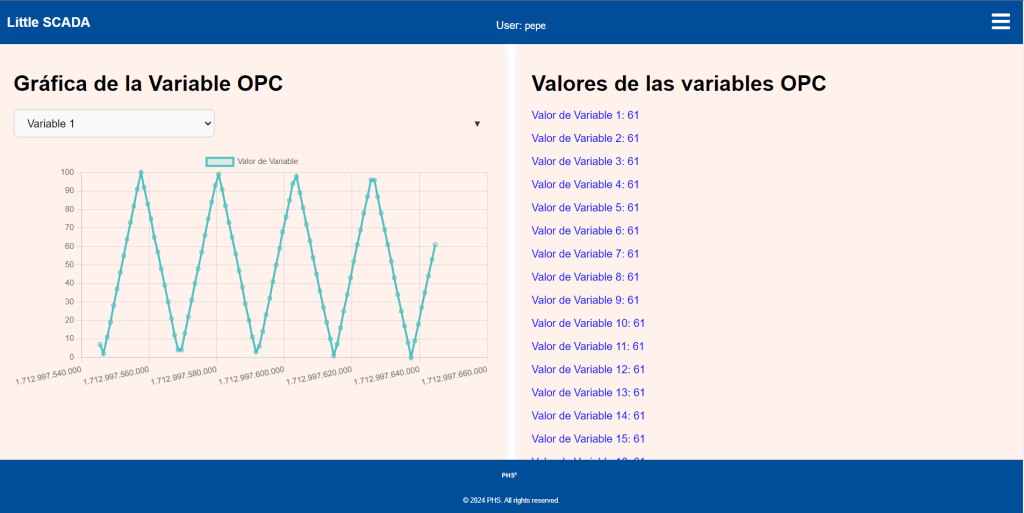
It is a simple representation, but enough to understand the potential of the tool. In this case we created the server ourselves, but it could perfectly come from a PLC, a plant OPC server or any other system publishing variables.
Conclusions
This article shows what can be built without mastering every syntax detail of every language involved, as long as artificial intelligence is used effectively and technical judgment remains in control.
- Keep the concepts clear: when we get lost in details, we need to return to the main idea and remember what we are trying to build.
- Reduce problems to their simplest form: AI works much better when tasks are small, well defined and testable.
- Keep technical judgment: AI works for us, but we must validate its outputs and provide clear instructions.
I hope you enjoyed it. In future articles we will continue growing Little SCADA with new features implemented with AI support.