

Temperature Simulator
In this example, we will perform temperature control of a simulated tank. We will use a simulated Siemens PLC, in this case, the PLCSIM advanced, to regulate the temperature inside a tank using PID control.
Once the control is established, we will hand over the controls to Little SCADA, generating an interface that allows us to view and manage the system. The first step is the temperature simulator.
I believe that developing this type of application, aimed at process simulation, can be very useful, as we often need to test our control systems in the most realistic way possible.
This series is divided into 3 articles:
- Tank Temperature Simulation: Heat Transfer Equation. (PART I)
- Temperature Regulation using a PID in Siemens PLC. (PART II)
- Control from Little SCADA. (PART III)
Tank Temperature Simulation
In this example, a tank has been modeled, for which we want to regulate its temperature through a chamber that exchanges heat with the fluid contained in the tank. It can be useful for any type of heat input, such as a heater.
Essentially, it is about adding heat to a system that loses heat to the outside.
In order to simplify things and focus on control, I will not develop the system of equations necessary to obtain the temperature equation. Ultimately, this equation comes from the mass balance and energy balance equations, solving for the variable of interest.
PLC Programming of the Simulator
For our case, let's get straight to the generation of temperature in the PLC (SCL for convenience).
"R_TRIG_DB_1"(CLK:="Clock_10Hz");We generate a periodic signal of 10 hertz, so we can see the variations without getting impatient =D
#ComponenteAleatoria := "LGF_RandomRange_Real"(minValue := -0.3, maxValue := 0.3, error => #StatError, status => #StatAleat, subfunctionStatus => #StatFunctStat);When we monitor a temperature in reality, we see that it rarely behaves in a completely predictable manner, as there are many factors that we may not be considering in our model. To represent this difficult-to-identify component, we create a random component that will vary the temperature randomly between its value and ± 0.3 ºC.
IF "R_TRIG_DB_1".Q THEN
// Calculate the temperature change
#dT := #k * (#T_fluido - #T_tanque) * #V_apertura + #h * (#T_ambiente_ext - #T_tanque);
// Update the ambient temperature
#T_tanque := #T_tanque + #dT+#ComponenteAleatoria;
END_IF;
This part of the code will execute with a positive edge of each clock signal, updating the temperature according to the given equation, where:
- dT: temperature differential.
- T_fluido: temperature of the fluid that exchanges heat with the tank.
- T_tanque: temperature inside the tank.
- T_ambiente_ext: temperature outside the tank.
- k: temperature transfer coefficient between the fluid and the tank.
- h: temperature transfer coefficient between the tank and the outside.
- Random component: randomness factor of the temperature.
Notes:
* The temperature transfer coefficients should be adjusted according to the model we want to simulate. If we have faster systems or those with low inertia, the coefficients will be higher and vice versa.
*The same applies to the temperature of the fluid and the outside, as they will determine the maximum temperature we can reach in the tank and the speed.
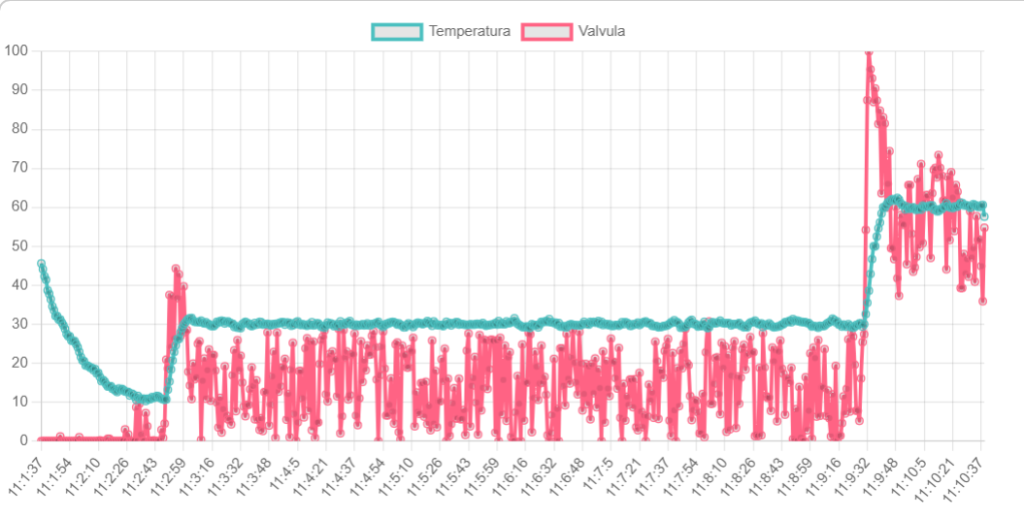
Example: although the goal of this article is not to show PID control or SCADA, I present a graph where it can be seen how the temperature we have simulated behaves very realistically.
Conclusions
Simulating processes is a way to save time and improve the quality of our control system startup.
By using energy equations in a simplified manner, we can obtain very realistic models that we can tackle with our PLCs. This temperature simulator can be very practical for anticipating problems during startup and evaluation of reports.
We do not need physical PLCs for our tests, as most development platforms provide us with simulation environments. (Siemens' environment is very comprehensive and intuitive).