
In today's practice, we will see how to create our own library with the functions that we will create for our projects, as sometimes we need to reuse them.
I will take as an example the last function I created, we create our FB, FC having declared its variables and implemented its code, it should be noted that we cannot add those Functions in which the project uses System Blocks -> Program Resources, that is, if in our FB we have added a TON Timer that is associated with its Instance DB, it cannot be added!

The first step will be to create the Library, we give it the name that interests us as well as the directory in which it will be created. It can be completed with the Author and Comment
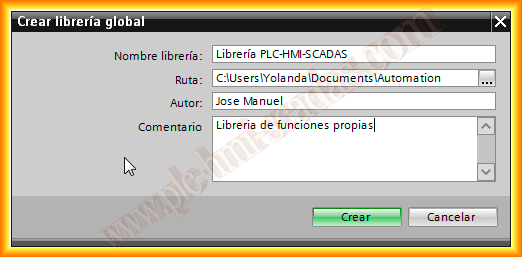

Once the library is created, it appears listed in Global Libraries, the next ideal step would be to create different folders for the 300/1200/1500 as sometimes they are not compatible with each other and within these we could continue classifying ...
How do we add the functions? Very easy, we just have to drag and drop from the program blocks, from where we created it, with this it will already be available for later use.
A recommendation is not to close the library unless we are sure that we will no longer edit it, as once closed and saved, it is only for use, we will not be able to add any new function

Assuming we have saved and closed the library and need to use it, we open the project in which we are interested in reusing a function and the first thing we do is open the library, we go to the directory where it was saved and note that the extension for libraries is *.al12, 12 because it was created with TIA Portal V.12
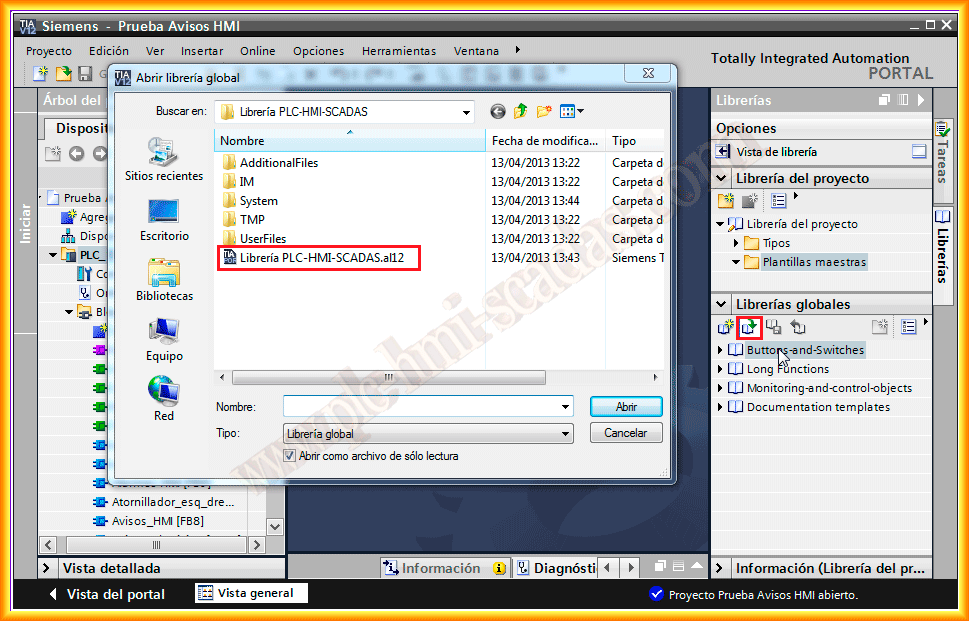
Once opened, we could reuse it and insert it where we find it interesting.
We also have the possibility of Project Library, but these are of Local scope, that is, for the project we are working on.

April 13, 2013