
WinCC OPC Server
In the following practice, we will see the OPC Servers available in WinCC.
-WinCC OPC DA
-WinCC OPC XML
-WinCC OPC UA

WinCC OPC DA Server
When we perform a complete installation of WinCC, the OPC Server is installed by default. As I mentioned, WinCC can be an OPC DA, XML, and UA Server; the first one we will look at is the DA.
To see the three cases, we will start from the basis that we have created a project and have it in Runtime. To check its operation, we will use the OPC Scout Client included in Simatic Net. We start a new project, and by default, it recognizes all the installed Servers on the PC, of the DA and UA types.
As can be seen in the image, when we are over the Server, we right-click to initiate the connection with it, and we can already see its information, including name and protocol used.

Now we will add the variables, which we only need to expand from the directory of interest and drag them to the Scout interface and in turn to the DA View. Once added, we click the Monitoring button to check the properties of the configured tags.

If we perform a check and write in WinCC, we will observe how the data is served to the client and updated with its values and properties.

WinCC OPC XML Server
The second one we will see is the XML Server, which, if the requirements have been met prior to installation, will also be installed with a Complete installation of WinCC, with the difference that it will require a separate license from the WinCC Option Connectivity Pack.
The prerequisites are the installation of the Internet Information Server, and within the IIS installation, install the same plugins as if it were the installation of the WinCC Web Navigator.
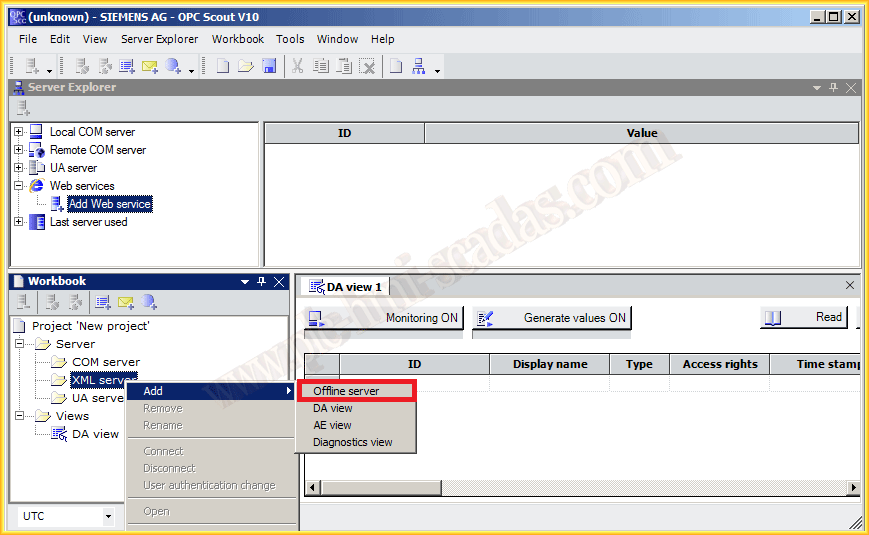

As we have mentioned, in this case, the servers of this class are not listed. The name with which we access it is the following:
http:/ComputerName/WinCC-OPC-Xml/DAWebservice.asmx
To add it to the Scout, as shown in the image.
We can now observe, as in the previous case, the information of it, and as a special feature, that the protocol used is HTTP/HTTPS.

We add the variables in the same way we did previously. And once added, we can monitor them to observe and write new values to check their operation.

With WinCC in Runtime, we perform the same test as before.

WinCC OPC UA Server
And to finish, we will look at the OPC UA, which is the latest technology in OPC and has considerable advantages over DA, the most important being that it does not use Microsoft’s DCOM technology, allowing us to have OPC Servers and Clients on other Operating Systems like Linux, for example.
In this case, in the Scout, it does list the servers of this type, and we can see that there are a series of them, because depending on the Security we employ, we will have certain credentials and certificates to access. For this example, we will try with the one that has no security.

We repeat the same steps we have performed previously...


August 26, 2014