Today we will look at the use of the BOOT/DHCP Server tool, which will be useful when we want to connect online with a PLC that has an Ethernet interface and we do not know its IP address to configure the link in RSLinx. This tool temporarily assigns an IP address.
Once we run it, the first screen is a Firewall alert, which we must allow traffic, and then a window appears to configure the network.
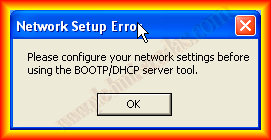
The type of link we are going to make is based on the MAC address of the device. The MAC address is the identity card of any device that has a network card, meaning there can never be two devices with the same address.
The configuration is based on the subnet mask; the program will scan for all devices within this subnet.
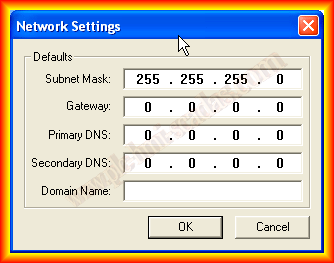
Once we have configured at least the Subnet Mask, all the devices found will show their MAC address, and as a DHCP server, we can assign the IP that interests us. An example is the Router we usually have at home; the router itself has a DHCP server that automatically assigns the IP address.
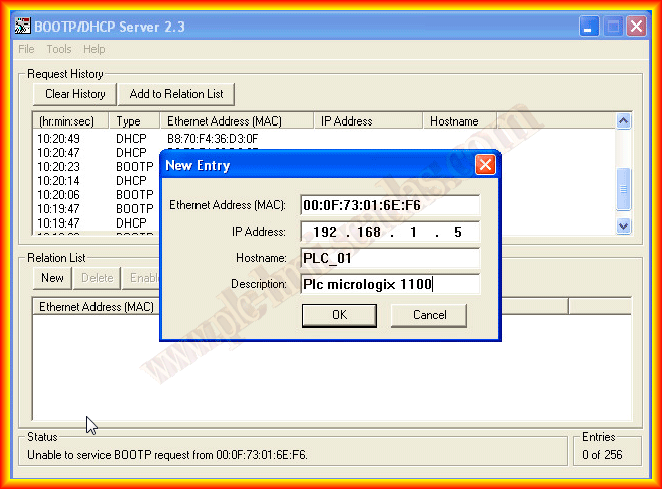
In the next image, you can see how it has found a device. The next thing we need to do is create a new entry, where we will relate the found MAC address with the IP address we assign.


Once the data is entered, it is added to the list of relationships, and the address is automatically assigned to the device, in this example a Micrologix.

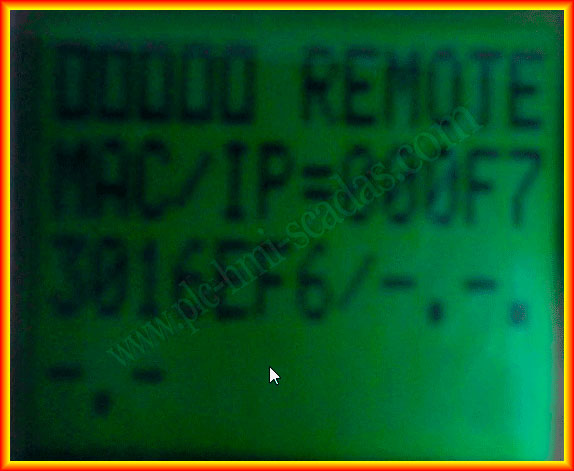
Finally, thanks to Miguel C., we can see a screen of a Micrologix, where its MAC address can be observed before assigning an IP address, and subsequently the same device with the assigned IP address.
We could now configure RSLinx with the Ethernet driver, and it will detect our Micrologix. We will be able to access online, and if we are interested, we configure and load the IP address in the project; otherwise, once we remove power from the device, this assigned IP address will not remain and will be erased.