
Parameterizing PowerFlex525 with Component Workbench


Continuing with the previous practice and thanks to my friend Raul, here we have our Micro830 and a PowerFlex 525 drive. With this type of drive, we have the possibility to parameterize it within the Component WorkBench via a USB cable, without the need for the 1203 USB converter, and we will see the process followed for this.
We add our drive to our project, in this case the mentioned 525, and once added we go to the parameters to adjust it to our motor and our needs. In this case, since we will control it from the PLC, we will change several parameters including 46-47, and in the latter, we will assign the speed reference with our analog output 4-20mA.

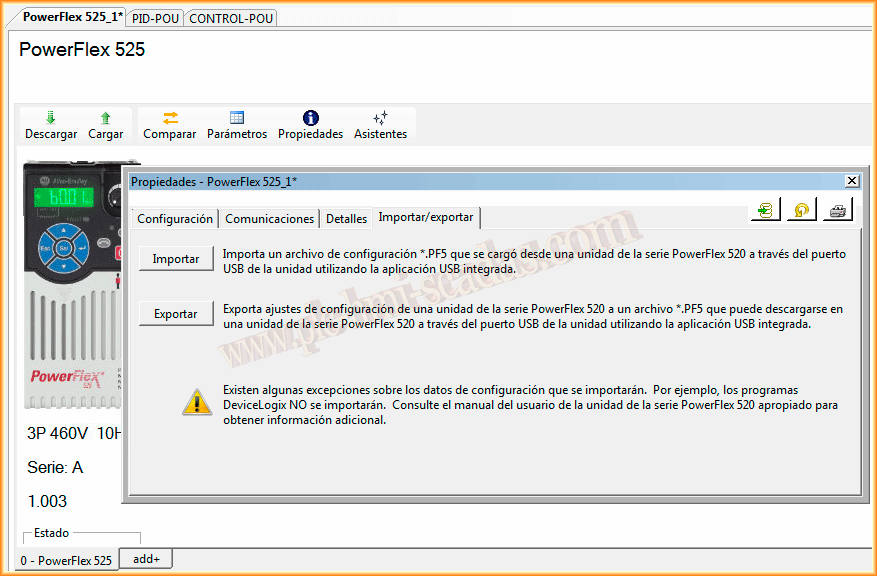
Once the parameters are adjusted, within the same environment, we will go to Properties, and within properties to the Import/Export tab, where we will export a *.PF5 file that will be the one we later transfer to the drive.
We will proceed to load our file to the drive. To do this, we connect a USB cable to the drive and automatically on our PC, a new directory will appear, just like when we connect a USB memory. Inside this unit, there are two files, a document with all the parameters of our drive GUIDE.pdf, and an application that we will use.
We run the application and we can already see that we are Connected. Next, since we already have our file, we will do a Download.


We follow the wizard, where the first step is to search for the file we created later. Once selected, we click next and continue with the wizard. As we can see, we have successfully transferred our new parameters to the PowerFlex525.


If you liked it or found it useful, share it ... :-)