
Update send e-mail with FTVSE
This is an update of the practice send email with Factory Talk View SE, as recently my friend Raul has had some problems and I have re-analyzed the reason for the error that he was getting when sending the mail "The message could not be sent to the SMTP server. The transport error code was 0x80040217. The server response was not available". If you are using Gmail as the SMTP server, this may be the reason.
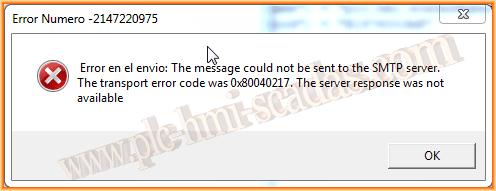
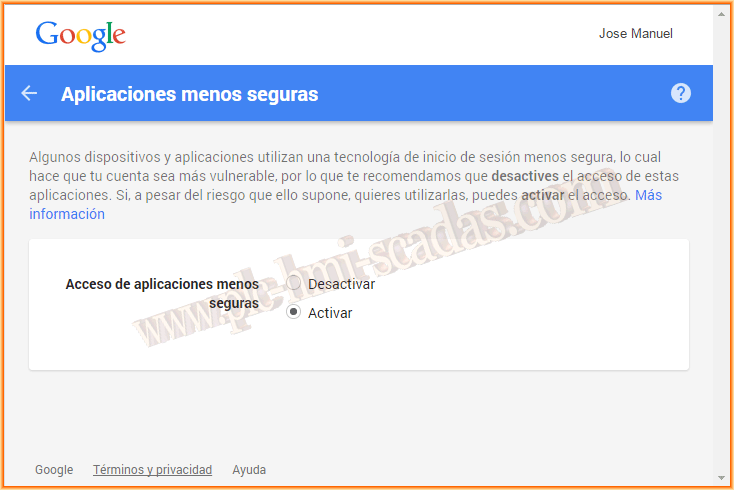
After analyzing the code over and over, changing settings and testing, I discovered that Gmail itself had blocked access to the server. I accessed the Google settings page and after changing the settings it worked perfectly.
You need to go to Settings --> Security --> lesssecureapps
The codes that work correctly are the following:
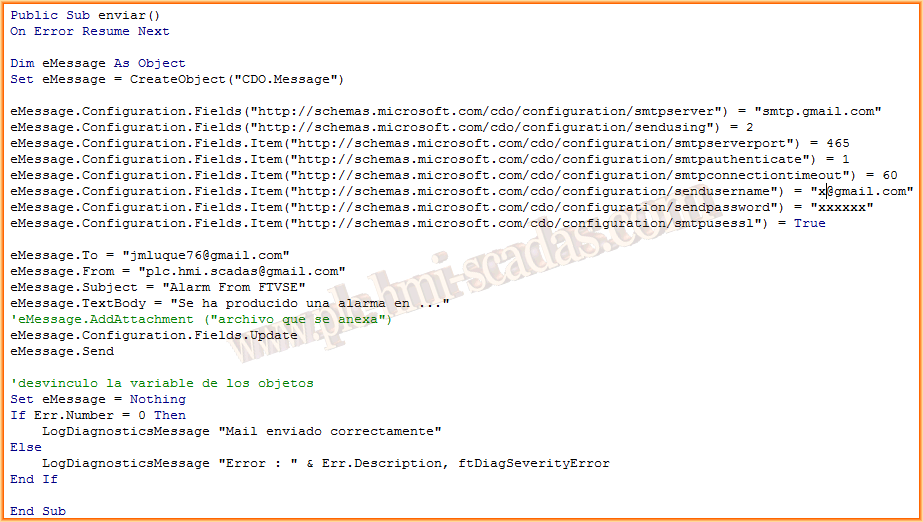
The same code, with some modifications, but which also works perfectly. We have already removed the msgbox for the message output and instead we use the LogDiagnosticsMessage function

March 26, 2015
If you liked it or found it useful, share it :-)