
Intouch Function GetNodeName();
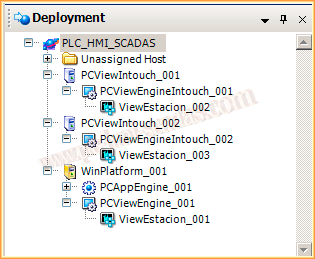
In the latest practices, we have been looking at a distributed application from Wonderware with the Application Server and ArchestrA.
Let’s assume the following scenario: we have a server with its instance of Intouch and two client machines. As can be seen, all machines are running the same instance, which means it is the same developed application.
The purpose of the practice is that even though it is the same application on all machines, the behavior will be different, and we will achieve this thanks to the function GetNodeName(String NodeName, Integer LongNodeName);
The example I am going to show will be as follows: each node will execute a different startup screen. Based on this example, and once we know the node where the application is running, we can implement the necessary instructions through conditionals to carry out the development of
the application, whether to show objects or not, whether they have write permissions or not, and everything else necessary. To start developing the application, within the Scripts, we will execute On Startup, initiating the call to the function GetNodeName(), and once we have saved the node name, we will call the function I created, MainScreen()
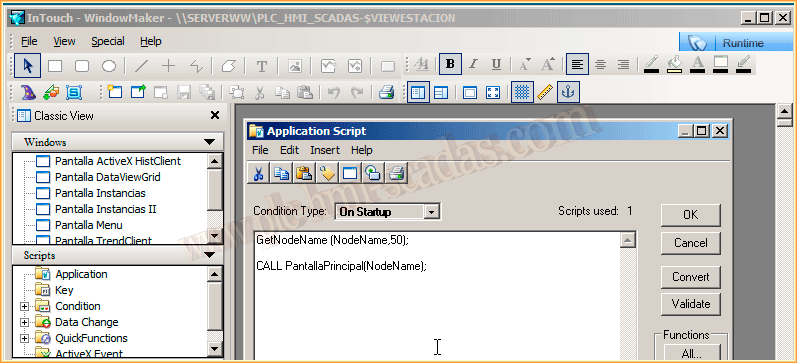
Once the application has started, we have saved the Node name "PC" and then we call the next function, where the parameter we pass is the Node name. Through conditionals, we will establish the startup screen depending on where the application is running.

In the WindowViewer configuration, we have set the startup screen to only the Menu, which occupies the header of our screen. Besides this common screen, the startup screen will depend on the Node.

Once the Runtime has been executed, we observe the menu on each of the nodes, where we can see in the variable NodeName the name of the Node where the application is running. Each of them has displayed its configured screen.


September 17, 2013