
WinCC Ping Function in VBScript

The following practice aims to ping the devices on our network, assuming that WinCC is running in the foreground and we do not have access to execute "cmd" directly, for that reason we will execute it from our image.
It could be a function that runs cyclically or ...
The example consists of pinging and saving the response in a plain text file, which we will later display on our screen in a ListBox object.
Once the file is read, we will be able to know if there is communication or not, which will trigger an alarm or produce an event or whatever the application requires.
Among all the ways to do it, I will propose two of them and mention a third.
The function will be the same in all of them, what varies between them is that in one of them while we are executing the function the cmd console will appear in the foreground, which does not create a very good impression, and the script would be the following.
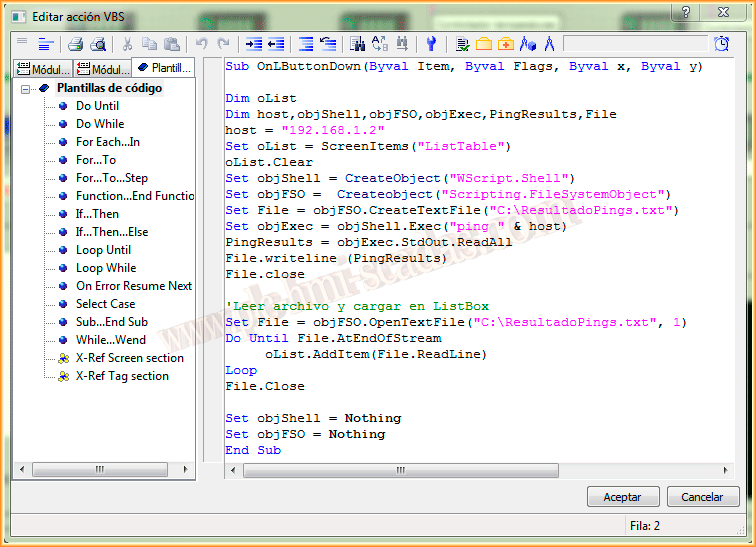
And in this second case, the window will remain hidden, this is possible because this time we have used the WScript.Shell Run object which allows us to pass the necessary arguments to hide it, however in the first script we used the WScript.Shell Exec object which does not have any argument to keep it hidden.

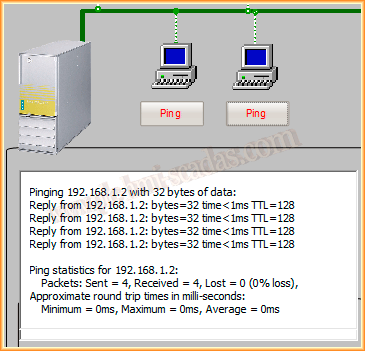
The other option we could have used would be to program it in C, since we have the stdlib library and the function, which allows us to pass the arguments in a string System("cmd /c ping 192.168.1.2 > ResultadoPings.txt")
As I explained earlier, " > ResultadoPings.txt " allows us to save the output in a file instead of displaying it on the screen, which we will read, display, etc...
January 22, 2014
If you liked it or found it useful ... Share it :-)