
WinCC Automate tasks with VBA
In the previous example we have seen how to display the keyboard in the Input and Output fields, but let's imagine that we have hundreds of Objects where we need to insert that line of code.
So we are going to make the most of Visual Basic Application to relieve us from a very monotonous task, where the most likely thing that usually happens is that we might overlook some object.
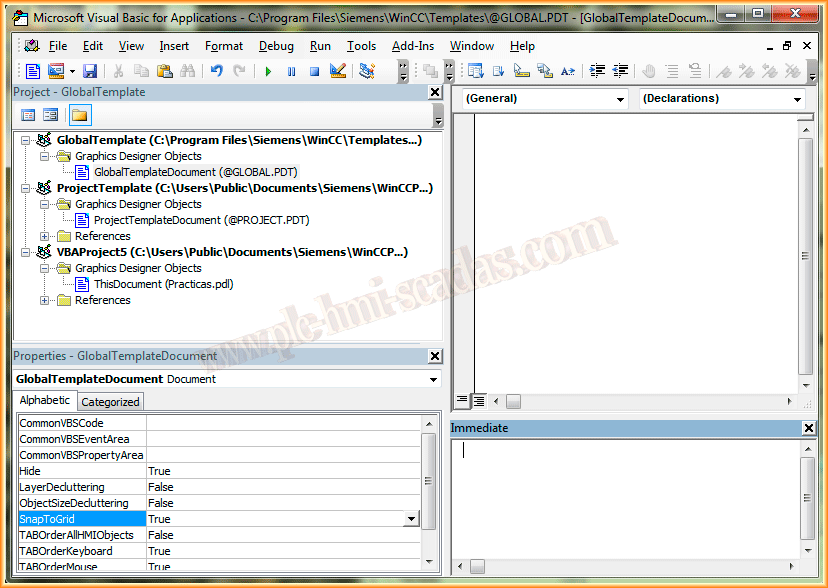
If we open the VBA editor, we will see GlobalTemplate where all the procedures/Functions we create will be at a Global level, meaning for all the projects we carry out with WinCC.
On the other hand, we have ProjectTemplate, in this case all the procedures/Functions we create will be at the Project level, with which we are currently working.
And finally, all the Pdl that we open has ThisDocument where all the procedures/Functions we create will be for that pdl.
So once we have made a brief description, let's move on to see the code that will do the work for us.
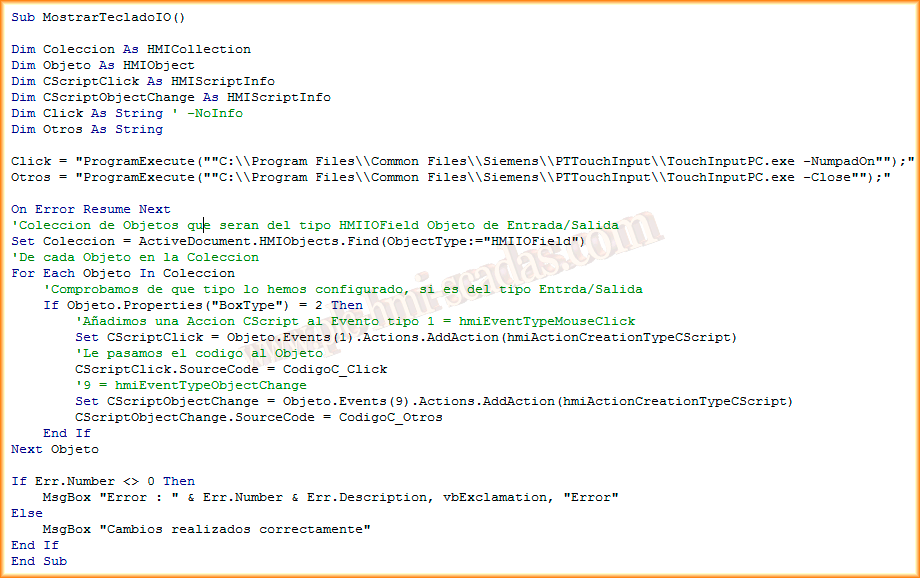
There are some lines that comment on what is being done in each line of code. There is a typographical error as the image exceeded the limits, in the lines x.SourceCode = CodigoC_xxx, this first part CodigoC is unnecessary.
And here is a short demonstration video where you can observe its operation; for better visualization, change the resolution to HD.
If you liked it or found it useful, share it ...