
WinCC - PM Quality (Introduction).


Before we start, THANK YOU in capital letters to my friend Cesar Fernandez, who, in the face of the possibility of collaborating on a project with PM-Quality and having no knowledge, here I am with my first steps.
I am starting from scratch; there may be some errors, so if you see that this is not the most correct way or there is a better alternative, feel free to send your comments.
And first of all, here is a description of this Add-On, extracted from the Official Siemens website, which you can find here
The acquisition, processing and archiving of batch-/job-oriented data like trends, alarms, set points and production set points and current values, Audit Trails and laboratory values as part of a comprehensive quality management system are the primary application domain of PM-QUALITY.
Data from various sources ranging from WinCC, PCS7, WinCC flexible, WinCC (TIA Portal) over OPC/DA and text import can be combined into meaningful reports and long term archived.
Whether seamlessly integrated into the WinCC operator screens or as a standalone office application, PM-QUALITY provides the required transparency.
The trends display that can also show data from several batches in comparison is combined with the overlay of additional information like alarms, event triggered readings, process phase transitions and annotations forming a full blown analysis tool with perfect usability.
Reports are always available at a glance when needed. The integrated report layout editor allows the creation of multiple different views over archived information that can be easily adapted to existing design guides.
The integrated, centralized engineering library PM-LIBRARY allows the exchange and reuse of already configured components in multiple projects.
The processing of readings with graphical calculation rules, the integration of day, week, month and shift protocols with the integrated shift calendar as well as the new reporting capabilities using Microsoft Excel are consequent and continuous extensions of the proven functionality of PM-QUALITY.
And the compliance statement can be found here and part of that information is as follows:
In the life sciences industry, important decisions are made based on records that are subject to legal regulations and are increasingly generated, processed, and stored electronically. Checks and disclosures of this data are also carried out electronically. For this reason, proper management of electronic records and signatures has become an important issue for the life sciences industry.
Consequently, supervisory authorities have established criteria for electronic records and electronic signatures to be considered as reliable and trustworthy as paper records and handwritten signatures on paper. These requirements were established by the "Food and Drug Administration" (FDA) of the USA in regulations 21 CFR Part 11 (21 CFR Part 11 Electronic Records; Electronic Signatures, US FDA, 1997; abbreviated: Part 11) and accepted by the European Commission in Annex 11 of the EU-GMP guidelines (EU guidelines on good manufacturing practices, volume 4, annex 11: Computerised Systems, European Commission, 2011; abbreviated: Annex 11).
Since the requirements for electronic records and signatures always presume a validated computer system, both sets of regulations also contain provisions regarding the validation and lifecycle of the computer system.
The application of Part 11 and Annex 11 (or their respective implementation in national legislation) is mandatory when electronic records and signatures are used. However, these provisions will only be applied within their scope.
The validity scope of both sets of regulations is defined by the regional market in which the finished pharmaceutical product is sold and by the fact that computer systems and electronic records are used as part of activities related to good manufacturing practices (see Part 11.1 and Annex 11, Fundamentals).
Once we have read part of the official documentation, we can summarize it greatly and say that the main task is the generation and extraction of data from the batches produced and their corresponding reports with all the necessary information to generate the accreditation documentation.
To begin with, and before performing the installation, we need to be clear about which architecture we are going to use, and I will base it on a Standalone architecture. All components on the same PC / Server. In a WinCC Single-User project.
And with the following illustration, we observe that the Add-On we are going to use consists of:
- -PM Agent
- -PM Server
- -PM Quality
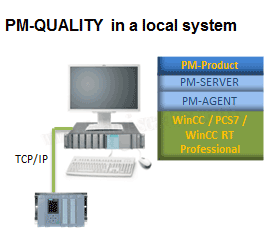
An extraction from the documentation of the modules that make up PM-Quality.

We move to action and create a new project of the Single-User type as we mentioned and observe just as we described earlier.
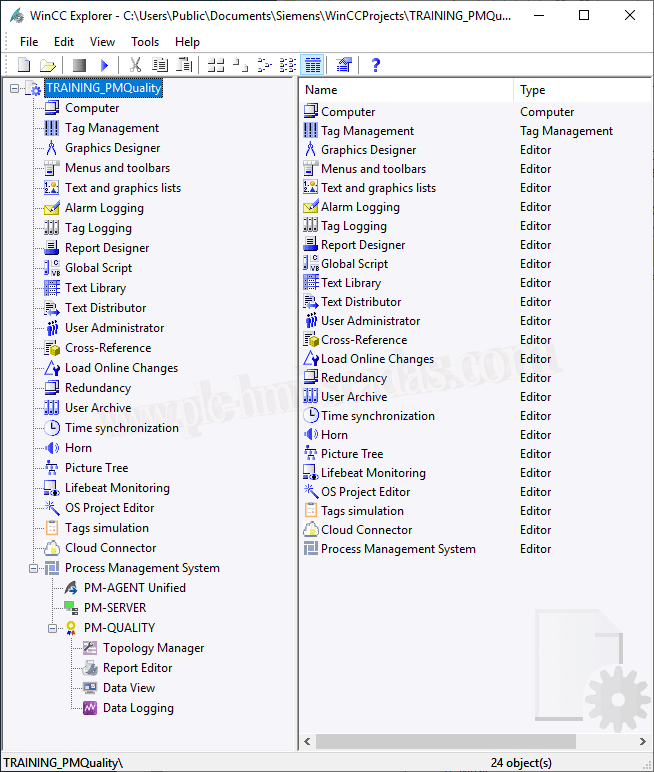
The steps to create the PM-Quality project within our WinCC project are as follows.
-Configuration of the PM-Server.
Just like the WinCC project is based on a Database in the SQLServer Engine, a PM-Server project uses the same philosophy. Within our WinCC project, there is a PM directory, which is where its project is located, redundancy intended.
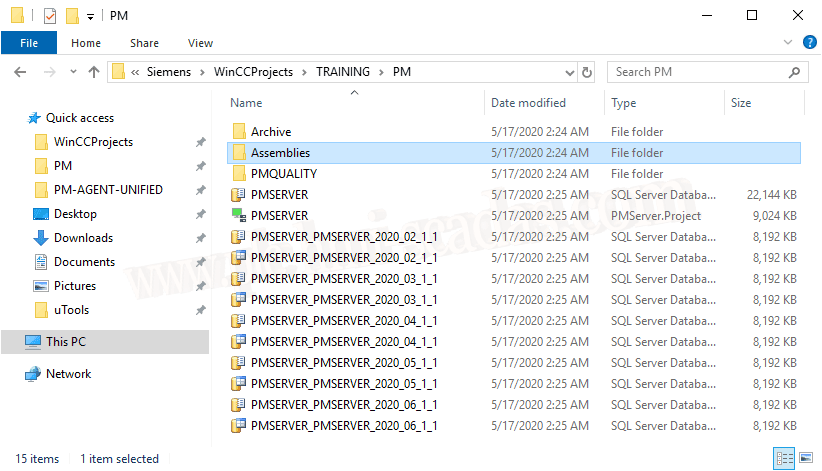
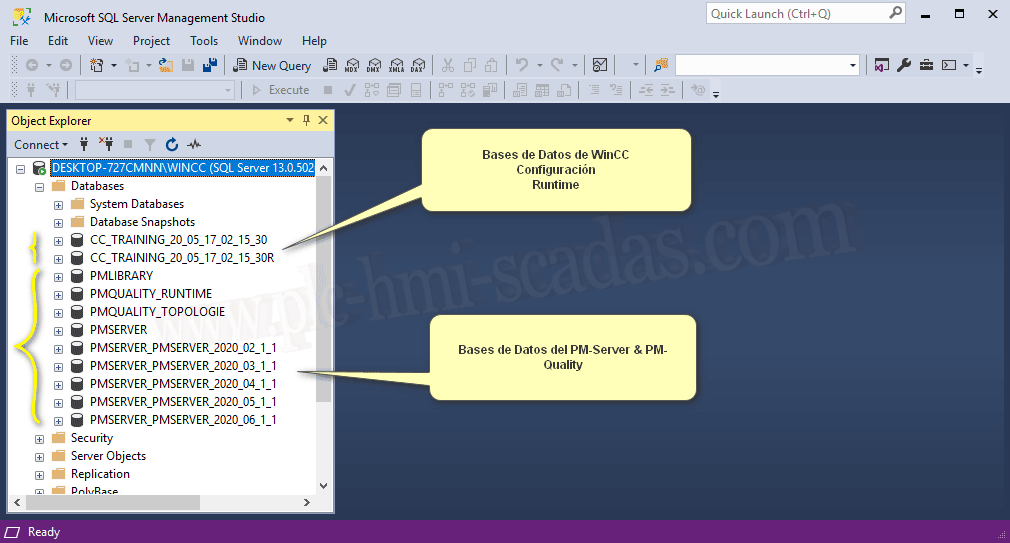
We already know that when we start WinCC, the Configuration and Runtime databases are loaded, and when we open the project, the PM-Server databases are also loaded.
Subsequently, when everything is configured, the PM-Quality services and processes connect as clients to the PM-Server.
If you ever encounter the error that the connection could not be established, the best way to check is to open the PM-Server, and if it hangs its project, the databases are loaded in SQL Server or you open the Management Studio and check that the databases are loaded.
Database PMSERVER: The name is quite clear; here is where the configuration we are making in the PM-Server is stored, redundancy intended.
Database PMQUALITY_TOPOLOGIE: Here is stored all the configuration of our topology or will be stored.
Database PMQUALITY_RUNTIME: Here all the Runtime information of the data defined in our topology is registered for subsequent analysis with the Report.
An image illustrating what we are talking about Project:PMSERVER, is the configuration we are discussing, which at this moment is an empty project, just like when we create a project in normal WinCC.
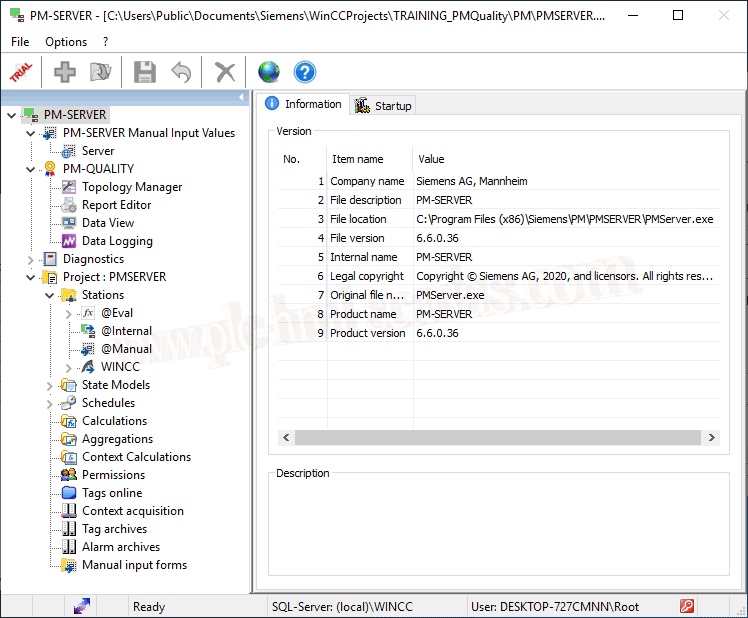
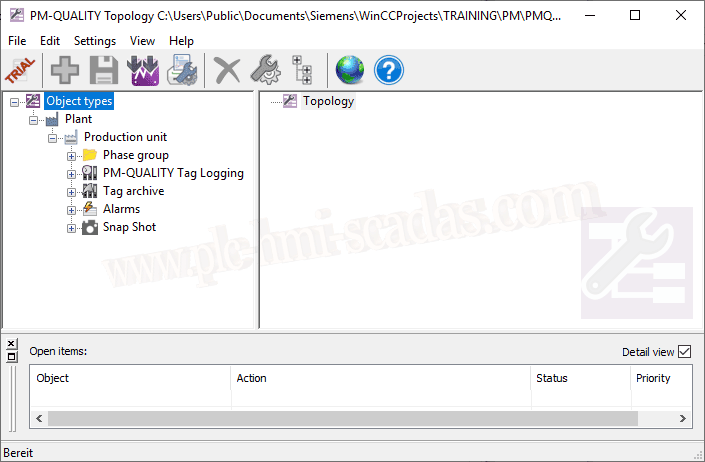
And out of curiosity, if we start opening the different components of PM-Quality -> Topology
The project is empty and we still have not defined any topology. The topology will be based on the architecture of the main tree, having at least one plant from which at least one production unit will derive and at most 100, with the rest of the components we have defined.
Report Editor, but we have not created any yet. This editor is launched independently from PM-Quality or from the topology because what we have there will be all the information we can document in the reports, and we will have as many as required.
The visualization of the batches with the most relevant data, for subsequent report generation, data export, printing, etc... We do not have data to visualize at the moment.
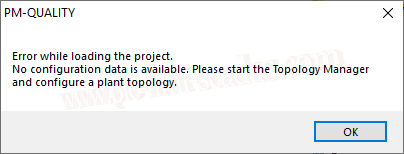
And we cannot open the Data Logging because there is no project created and it is not running; this component will take care of recording the information we have configured in our topology, and it is recorded in the database for later consultation and report generation.
Now we are going to configure the PM-Server project; we will continue in the next article.
16-05-2020