
What is HistData? The HistData "Intouch Historical Data Access System" is the native Intouch application for extracting data stored in files (Historical Log files *.lgh)

To use HistData, we first need to create some variables and their corresponding access name. The easiest way is to insert a HistData Panel Wizard object, and it will do this work for us ;-)
The only thing we need to define is the variable set for the Historical Trend Chart and the number of records we want to export between the start and end, of all the values displayed in the chart.

It will create the following access name
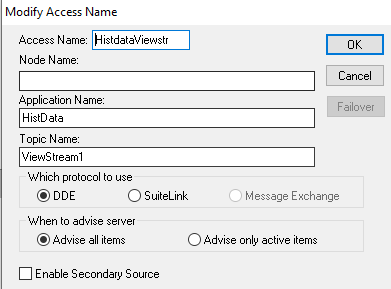
And the following variables, which clearly point to their access name

By doing it automatically with the wizard, there are two variables that are not created, and if we are interested in using them, we need to create them ourselves, which are the following:

We now have everything we need to extract data. It is worth noting that we have two methods for exporting data:
Manual: This means that we assign the parameters we are interested in to the previous variables and perform the export by writing the variable HDWWriteFile to 1
Automatic: The automatic way is with the object we just saw and the current configuration of our ActiveX Historical Trend Chart object, by pressing the Save To File button

For more information about all the tags, it is mandatory reading the manual ITDataManagement.pdf which you can find here in addition to many Tech Notes ;-)
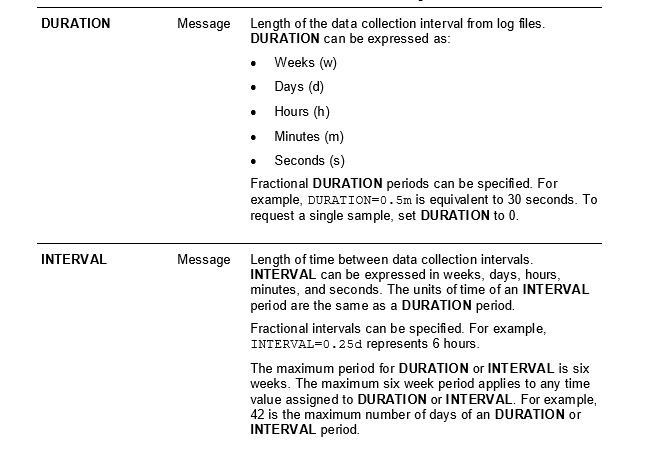
However, I will highlight a couple of tags where the duration and interval are parameterized, because this is where the maximum number of records we can export is defined, which is 42 days.
In the next part, we will move on to practice and other important details we need to know...